The short version
- Name the move, and a real reference for it. One sentence, plus something to measure against: a martial-art technique, a game move, a video. If the person you build for names a move (Ryu's Shoryuken, Tekken's Spinning Demon), find that exact move before you build anything. Our first two floor sweeps followed a different move and were thrown away.
- Pick the method (section 1): retarget a capture, read the move off a video, or build it from keys.
- Get the motion. Use captures whose licence allows it (section 3). Footage is reference only: look at it and measure it, never ship it. Download whatever helps, delete it when you are done.
- Build the clip over the shared guard pose. Every clip starts and ends in the same stance, so clips chain without a pop, and "does the last frame match the first" is a free test.
- Check numbers first, pictures second (section 8): foot slide, one-frame flips, arms inside the body, the floor, the end pose. Then contact sheets from several sides, slow motion at the blow, and a short movie.
- Wire it in and show it (section 10): add the state, run the tests on both bodies, send the person a movie. Their next sentence is the next specification.
- Write down what you decided and why, next to the code, and delete your downloads.
1. Pick the method
| You have | Method | In iamar |
|---|---|---|
| A capture of the move that you may use | A. Retarget the capture | jab, cross, hooks, front, round and back kicks, the blocks (low, mid, high) |
| A capture of something close to it | A, then author the missing limb or leap | the dragon punch (a captured crouch-and-drive with an authored fist and jump), the backfists, the superman punch |
| Only a video of the move | B. Read it off the video, then build it from what you measured | the spinning floor sweep, the axe kick |
| A reference you can only look at (a game, a drawing), or none | C. Build it from keys over the guard | the Shoryuken uppercut |
| The other side of a blow: how the opponent reacts | C, with the reaction recipe (section 7) | all 22 hit reactions |
A capture gives you the small things for free: the weight shift, the way the hips lead the shoulders, the settle after a blow. Video and keys give you moves nobody captured. A hybrid is often the best: a captured body with an authored arm.
2. What you are making
States and clips
The built-in bodies (the male and female look.body, in any outfit) play named states: idle, walk, sit, talk, the fight guard fight, every strike, block and reaction, the dances. A state maps to a clip. A strike plays once and settles into the guard; idles and dances loop until told to stop. In a world an NPC takes a state name as its idle (WORLD_FORMAT section 4.13). In the running game the fight states play from chat, and other players see them: /fight raises the guard, /jab, /kick_sweep or /hit_jab play a strike or a reaction, /moves lists them all.
A character of your own, a glTF model with its own skeleton, plays the animations in its .glb by name: idle and walk in its NPC entry, animation on an object, entity_play_anim from a script. Everything below about how to make a good move applies to it. What changes is the last step: your clips must be joint rotations on your skeleton, and Godot resamples every clip at 30 frames a second on import (see the gltf_clip_fps recipe in TECHNIQUES), so a stroke faster than 15 Hz aliases away.
The clip format of the built-in bodies
Clips are data, not rotations. assets/anims/combat_mocap.json holds {"clips": {"<name>": {"fps": 60, "len": seconds, "loop": false, "hits": [seconds, ...], "ch": {channel: flat list of numbers}}}}. A clip describes the pose with targets for the limbs, not angles for the joints, and the baker solves two-bone limbs on whichever body plays it. So one clip fits the male and the female body, tall and short, a foot lands where the solver puts it, and a hand never stretches past its arm. Model space is +Z forward, +X the character's left, Y up, metres.
| Channel | Numbers per frame | What it is |
|---|---|---|
pel_pos | 3 | pelvis offset from its rest position |
pel_q, chest_q, head_q | 4 each | orientation as a quaternion (x, y, z, w): the pelvis in the world, the chest relative to the pelvis, the head in the world |
hl_rel, hr_rel | 3 each | each hand as an offset from its own shoulder joint, so an arm keeps its shape at any arm length |
fl, fr, fl_q, fr_q | 3 and 4 | ankle positions and foot orientations |
clav_l, clav_r | 3 each | shoulder girdle (clavicle) direction offsets |
pole_al, pole_ar, pole_ll, pole_lr | 3 each | which way the elbows and knees bend (a pole direction) |
roll_l, roll_r | 1 each | forearm roll in degrees |
open_l, open_r, hflat_l, hflat_r | 1 each | optional: fingers open (0 a fist, 1 an open hand), and the hand laid flat, palm down |
Rules of the format: 60 frames a second; the first and last frame of a strike are the guard; hits lists the clip times where a blow lands (use them for damage, a sound, a camera shake, and to start the victim's reaction, MocapClips.hit_times(name)). The baker turns a clip into rotation tracks the first time a body plays it (a few milliseconds, about 100 KB per clip per body shape, more for the long falls) and the data stays resident as packed 32-bit floats. All 51 clips are 2.6 MB on disk: 17 to 84 KB each for the 29 moves (43 KB on average), 26 to 105 KB for the 22 reactions (61 KB on average).
3. Where motion comes from, and what you may use
| Source | Licence | What we did with it |
|---|---|---|
| CMU Graphics Lab Motion Capture Database (mocap.cs.cmu.edu), BVH conversions | free for any use, commercial included | boxing (subjects 13 and 14), a karate expert (subject 135: kata, blocks, kicks), more: most of the captured moves |
| Karate athlete captures, Szczesna, Blaszczyszyn and Pawlyta, Scientific Data 2021 (figshare article 12925757) | CC0 | the kicks: front, roundhouse, spinning back (C3D files) |
| Free packs on mocapdata.com | CC BY-SA 2.1 Japan, share-alike: anything derived has to be shared alike | left alone |
| Bandai Namco research motion dataset | CC BY-NC-ND: non-commercial, no derivatives | not used |
| Kraków karate database, SFU, TH Köln | not reachable when we tried, or no licence seen | not used |
| Videos and game footage | not data, and not ours | reference only: look, measure, then author your own clip. Never ship a video or copy anyone's animation data |
Credit every dataset you use. The data file carries its credit line (credit in combat_mocap.json) and the state table in docs/COMBAT_ANIMATIONS.md names the source of every clip.
The CMU trial list of any subject can be read with curl (the site's certificate chain is incomplete, so browsers refuse it):
curl -k "https://mocap.cs.cmu.edu/search.php?subjectnumber=135&motion=%"Things that did not pay: subject 144 ("punching female") holds slow block and punch drills with a slouched, head-down posture; subject 135 is the good source. None of the CMU fighting trials is an uppercut, a backfist, an axe kick or a sweep, which is why those moves are built, not captured.
Downloads are untrusted data. Put each in its own folder, never execute anything from it, read it with Python in isolated mode (python3 -I), and delete it when you are done. A fetch script (tools/mocap/fetch_sources.sh) re-downloads ours in a minute, so there is no reason to keep them.
4. Recipe A: retarget a capture
- Fetch the takes you chose (BVH, or C3D from a lab). Data only.
- Find the move inside a long take.
events.pylists wrist-speed peaks and high-foot kicks in BVH takes,classify2.pytells straight punches (the arm reaches about 0.95 of its length or more) from hooks and uppercuts by the hand's path,blocks.pylists the blocks of a take,c3d_events.pydoes the same for C3D. Then look at the window before you build it (section 8): a take's label is not always what the performer did. - Cut the window and retarget it. One line per clip in
tools/mocap/build_clips.sh(name, take, start and end second, options):
clip Fight_Hook_L   14_01 19.3 20.35 --hit 19.81
clip Fight_Overhand 14_02 14.4 15.45 --hit 14.95
clip Fight_Combo 14_01 23.4 26.0 --hit 23.7 --hit 24.3 --hit 25.4 --hit 25.6 --hit 25.8- Let the retarget do the boring work (the list below). It writes the channels of section 2.
- Mirror for the other side.
--mirrorflips a clip: capture the right hand, ship both. - Add the clip to the ship list in
build_clips.sh, run it, rungodot --headless --import(the class cache), then the tests (section 8).
What tools/mocap/retarget.py does for you:
- Turns the take so the performer faces the stance direction, and scales it to this skeleton's legs (leg length, not height).
- Pins planted feet: a foot that travels fast over the floor is lifted a little, a shuffle, never a skate. It eases out the net travel so a strike plays in place.
- Starts and ends on the shared guard pose: a short blend in (0.15 s by default), a longer one out (0.25 s), with a step where a foot has to move.
- Holds the blow on contact for a moment, the hit-stop of fighting games, about 0.07 s, and records the time each blow lands.
- Keeps the arms out of the body with a clearance pass (section 9).
The useful options of retarget.py clip:
| Option | What it does |
|---|---|
--name N --out f.json | the clip name and the file it is merged into |
--mirror | the same take for the other side |
--speed S | play faster or slower (our blocks run at 1.35) |
--hit T | the second in the take where a blow lands: adds the hit-stop and records the time. Repeat it for a combo |
--hold H --holdwidth W | how long the hit-stop is: the default holds the pose about 0.07 s, the blocks about 0.2 s |
--intro S, --outro S | the blend in from the guard and out to it |
--loop | a clip that loops (idle) |
--uppercut, --backfist, --jump, --lowkick, --crouch | author a limb or a leap over the captured body, when the take has the body but not the move |
The guard. All clips blend into one shared pose: a boxing guard taken from a CMU take and saved in tools/mocap/guard.json (retarget.py guard <take> <seconds> guard.json). Pick your guard once and keep it. Everything that follows (blending, reactions, the end-pose test) depends on every clip agreeing about where "ready" is.
5. Recipe B: read a move off a video
Use this when the move is real but nobody captured it: a taekwondo axe kick, a stunt performer's spinning sweep. It cost us the most rounds, because a video shows what happened, not what was meant. The loop that finally worked:
- Find footage of exactly the move. A steady camera, side-on or front-on, one clear repetition, ideally a slow-motion or training-mode replay at 30 or 60 frames a second.
yt-dlpfetches it (use the newest release; ask for the video only,-f "bv*[height<=720][ext=mp4]"; a network that gets "Sign in to confirm you're not a bot" is the wrong network, try another). - Find the repetition.
video_sheet.py video t0 t1 n cols tile_w out.png [crop]makes a contact sheet of n evenly spaced frames, each labelled with its frame number and time. Narrowt0andt1until one move fills the sheet, then use theframesmode to step every source frame. - Calibrate. Write a small file next to the tools (
tools/mocap/video_ref/<name>.json): the video, the start secondt0, thecropin pixels,pivot_px(the planted ankle in the crop),kpx(metres per pixel, set so the performer's leg is your skeleton's leg, 0.887 m for ours) andankle(0.086, the ankle height with the sole on the floor).video_grid.pylays a metric grid over the frames: in a side-on view vertical positions are exact, depth and heading are not. - Measure.
pose_video.pytracks the pose with MediaPipe's heavy landmarker (33 landmarks, in the image and in metres),pose_overlay.pydraws the skeleton on the frames so you can see where the tracker is wrong, andkick_angles.py/kick_summary.pytabulate a side-on kick: thigh and shank from vertical, knee flexion, trunk lean, heights, timing. Write the numbers down as a table of key times: pelvis height and turn, leg angles from vertical in the world, trunk lean, where the hands are. - Build the clip from the table over the guard (
tools/mocap/author.py,sweep_back.py). Every key table is a named constant with the video's times in a comment, so a request like "lower" or "faster" is a one-line change (LOW_LEG,SPEED). The clip ends exactly in the guard. - Bake it and compare.
dump_clip.gdwrites the baked joint positions;kick_check.pyandsweep_check.pyplot them over the same quantities read off the video and print the rms differences;compare_render.pyputs the video frame beside the character, rendered from the video's camera at the same instants ("mirror": truein the calibration flips the video for a performer who uses the other leg). Fix numbers first, pictures second. The kick's curves matched within 3 degrees only after a world-frame fix that no picture had shown. - Decide with the person what to change from the video. Our sweep keeps the leg at ankle height (the video's was knee height) and plays 1.3 times faster; the axe kick has two versions, as measured and a more dramatic one, shown side by side in one reel, and the person chose.
Traps of the tracker:
- Left and right labels swap, and the nose and shoulders land on the wrong side, in a low spin. Heights of hips and ankles hold up.
- Monocular 3D fits give nonsense depth. The tracker's depth is good for the sign of a turn only: which shoulder is nearer at mid-turn. The hip-line angle of the world landmarks, unwrapped, gave the pelvis heading history of the sweep: a slow wind-up, a whip, a hold, the rest of the turn.
- A performer's proportions are not your skeleton's. Their arms were 0.54 to 0.61 m, ours 0.49 m, so with the hips where theirs were a palm cannot reach the floor. We lowered the hips and leaned further.
- A look-alike is not the move. The first sweep followed a wushu sweep (hands down, trunk bent forward: on this skeleton it read as an ape crawl), the second a "squat" variant that held its arms out like wings. Neither was the spinning sweep the person meant. Confirm the exact move with them before measuring it.
6. Recipe C: build a move from keys
When there is no capture and no clean video, or the reference is a game move you can only look at, build the move from keys. tools/mocap/react.py turns a handful of snapshots into a clip over the guard:
r = Reaction(guard)                    # everything is relative to the shared guard pose
r.at(0.20, pY=-0.30, pitch=9)          # at 0.2 s the pelvis is 0.3 m lower and bowed 9 degrees
r.at(0.27, cp=-2, cy=14, hp=-14)       # chest bow, chest turn, head bow
r.resp("hp", -40, 0.07, 0.18, 0.14)    # a push on the head: peaks 0.07 s in, back through zero 0.18 s later, overshoots 14 percent
Each parameter is a curve through the values you name, eased by PCHIP (smooth, and it never overshoots: any overshoot is one you keyed, the way an animator would), and it starts and ends at its guard value. The parameters are in the units of the body, metres and degrees:
| Group | Parameters | Meaning |
|---|---|---|
| Pelvis | pX pY pZ, dyaw, pitch, roll | world offset from the guard pelvis; turn left is plus, bow forward is plus, lean left is plus |
| Chest and head | cp cy cr, hp hy hr | bow, turn and lean of the chest relative to the pelvis, of the head relative to the chest |
| Hands | hlx hly hlz, hrx hry hrz | offset from the guard hand in the chest's frame (x left, y up, z forward) |
| Hands on a world point | hlw, hlWx hlWy hlWz (and the right) | how far the hand goes to a world point instead of riding the chest: a hand on the floor |
| Feet | flx fly flz, frx fry frz | ankle offsets from the guard ankle in the world (planted) |
| Feet riding the body | fbw_l, flbx flby flbz | how far the foot rides the pelvis, and its place in the pelvis frame: a body in the air or sitting |
| Feet with their own angles | fsw_l, fsp_l fsy_l fsr_l | a foot lying or sitting: toes up, turned, rolled |
| Bend directions | kl, kr, al, ar | knee and elbow directions |
| Fingers | open_l, hflat_l (and the right) | open fingers, a flat hand |
| Floor | floor_w, lift, keep_off_floor | the body lies on the floor (fit it to the mesh), a bounce, never go through the floor |
Besides snapshots: resp(name, amount, t_peak, t_settle, overshoot, t0) is a push that peaks, springs back through zero, overshoots a little and settles; ramp is a smooth step to a new value; bump goes up and back (a foot's lift on a step); step(foot, ...) moves a foot over the floor and lifts it on the way. The body is a rigid chain from these (pelvis, spine and head by quaternions, hands and feet by targets for the two-bone solver), so feet stay where they are put and an arm never stretches.
Worked example: Ryu's Shoryuken
The person asked for the uppercut to look like Ryu's from Street Fighter; the one we had, a captured crouch-and-drive with an authored arm, was not it. We looked at the arcade sprite sheet and at Street Fighter V in training mode, slowed down (a 3D model, so we could read the body), and wrote down what the move does: a drop into a crouch with the fist at the hip; the legs drive and the fist climbs the front of the body, passing the chin; the body leaves the floor with the fist straight overhead and the elbow locked; the other fist is pulled in at the side; the punching side's knee is drawn up and the other leg hangs straight with the toe pointed; the arm stays up until the feet are nearly down; a crouching landing. Then, trimmed from react_lib.py:
punch, other = side, ("l" if side == "r" else "r")   # the punching side, the other side
sd = 1.0 if side == "r" else -1.0                     # the left fist is the mirror
# the pelvis: (time, up, forward, lean, turn)
for t, up, fw, pit, yaw in (
        (0.00, 0.00, 0.00, 0, 0), (0.10, -0.10, 0.02, 4, 4), (0.20, -0.30, 0.05, 9, 9),
        (0.27, -0.03, 0.08, 0, 26), (0.47, 0.50, 0.12, -7, 30), (0.63, 0.62, 0.12, -8, 26),
        (0.95, 0.11, 0.03, 2, 8), (1.03, -0.14, 0.00, 8, 3), (1.34, 0.00, 0.00, 0, 0)):
    pelvis(r, t, y=up, z=fw, pitch=pit, yaw=yaw * sd)
# the punching fist, from the shoulder in the chest's frame: the hip, the chin at 0.27 s, straight up
for t, v in ((0.20, (-0.05, -0.30, 0.08)), (0.27, (-0.02, 0.17, 0.30)),
             (0.50, (-0.02, 0.495, 0.03)), (0.70, (-0.02, 0.495, 0.03))):
    hand(r, t, punch, (v[0] * sd, v[1], v[2]))
# the legs ride the body once they leave the floor; the other leg hangs, toe pointed
foot_lie(r, 0.63, other, -55.0, r.fyaw0[other])
# the hit-stop, and the key time of the blow
return r, {"hold": 0.72, "hit": 0.27, "strike": True}
What the numbers say: the pelvis drops 0.30 m below standing, then rises to 0.62 m above it by 0.63 s while turning up to 30 degrees; the fist passes the chin at the key time 0.27 s; at 0.93 s both feet reach for the floor in the guard's own stance, so the hand-over to planted feet at the landing slides nothing. The hit-stop stretches the clip, and Reaction.build returns where the blow now is (0.315 s of clip time), which is written to hits.

7. What happens to the one who is hit
Every strike has a reaction clip for the opponent (hit_<strike>: 22 of them), because a blow that lands on a body that does not react looks like a miss. No capture of being hit exists, so they are all built with method C. What they have in common:
- A reaction starts at the instant the blow lands and ends in the guard. The first frame is the contact. The game plays the reaction when the attacker's
MocapClips.hit_times(...)[0]has passed. - Order of events. The head snaps first (it peaks about 0.07 s after the blow), the chest follows a beat later (0.12 s), the pelvis and knees after that (0.16 s); the arms drop or flail; then the body recovers, with an overshoot that you key. This is what slow-motion knockout replays show.
- Make it big. A hit reads at small size on a game screen: our head extension is about 40 degrees at full power. Every reaction takes a power
pso it can be turned down. - Light hits are standing flinches (a jab, a hook, a kick to the belly): a few
respcalls on the head, chest, pelvis, hands and feet, grouped ashead_hit,body_fold,chest_pushandleg_buckle. - Heavy hits are knockdowns: a fall, a lie and a get-up in one clip. The clip ends in the guard at the place it started, so the character's root does not need to move; the get-up walks back into the guard spot. A game that wants the knockback on the root removes the walk and moves the root instead.
A knockdown in five parts (the uppercut victim)
The Shoryuken throws the opponent up and back. The person's words were "fly backwards" and "land on the ground afterwards".
- The flight (
fly_back): the pelvis follows an arc as fractions of the flight time (1.3 m back, 0.85 m above standing at the top), the chin is snapped up, the body rotates backward past horizontal (to minus 125 degrees), the arms are flung wide and the knees kicked up over the hips. The limbs ride the body (fbw). - The landing on the back at 0.95 s: the body touches the floor (
floor_wgoes to 1), slaps it and bounces a little (lift). The pelvis height is fitted to the real mesh, below. - The lie: stunned for about 0.3 s, hands and feet placed by world points (
lying_world), hands flat, elbows pointing away from the floor. - The get-up (
get_up_back): sit up, draw the knees in, push, stand, with a lift of each foot as it moves. - The walk back (
walk=1.3): alternating steps back to the guard spot, ending in the guard exactly. Total 4.1 s.
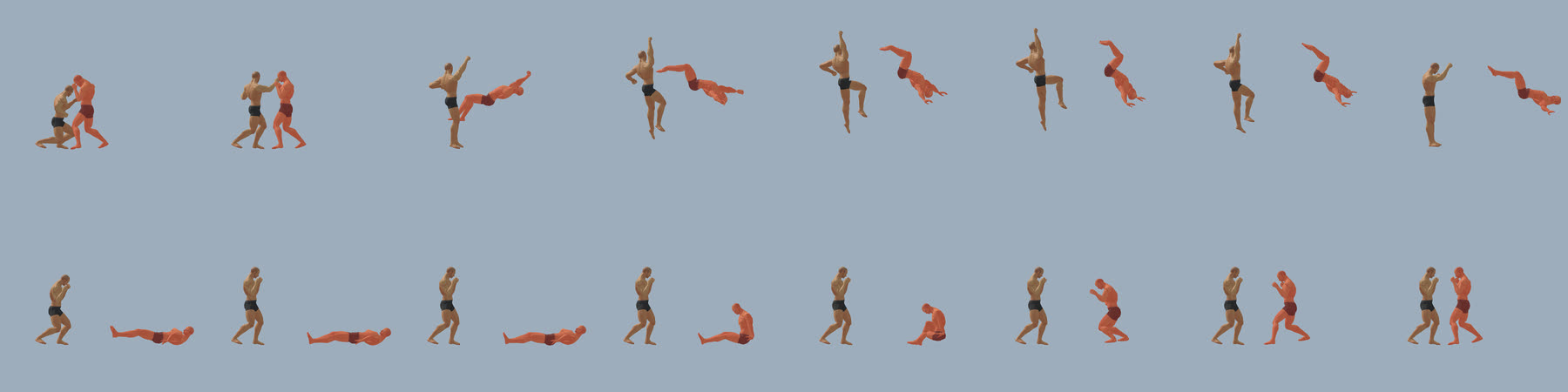
Fit a lying body to the floor
A lying body has to touch the floor, not hover and not sink, and it has to do so on every body shape. We measure it on the real mesh: tools/mocap/floor_check.gd skins the body on the CPU for every frame and reports the lowest vertex of the head, the back (spine and pelvis), the arms, the legs and the feet. build_reactions.sh builds the clips, measures them, rebuilds with the measurement (the pelvis is raised or lowered so the back, head and legs touch where floor_w says the body lies on the floor, and keep_off_floor keeps a falling body out of the floor everywhere else) and measures again.
8. Check it: numbers first, pictures second
Pictures flatter. Run the numbers on both bodies (male and female) before you look.
| Check | Tool | Passes when | What failure looks like |
|---|---|---|---|
| Starts and ends in the guard | combat_clips_test.gd | hands, feet and head end within 0.02 m of where they started | a pop when the clip hands over to the guard |
| Planted feet do not slide | combat_clips_test.gd | a foot whose ankle is under 0.095 m moves under 0.6 m/s (1.5 m/s in a fall, where a body skids) | skating |
| No flips | combat_clips_test.gd | no bone turns more than 90 degrees in one frame at 60 fps | a limb snaps for a frame |
| No leg folded through itself | combat_clips_test.gd | an ankle never comes within 0.15 m of its own hip (0.3 for a hand-keyed clip) | a knee through the thigh |
| Feet above the floor | combat_clips_test.gd | an ankle never below 0.05 m (the floor is 0.086 m) | feet through the ground |
| Arms out of the body | arm_check.gd (ARM_VERBOSE=1 for every frame) | most clips under 1.5 cm, nothing over 5 cm | an elbow in the ribs |
| Body against the floor | floor_check.gd | the lowest vertex within about 1.5 cm of the floor where the body lies (a thumb or a heel may dip a little more for a few frames), above it in the air | sinking or hovering |
| Every state plays through the real player | combat_play_test.gd | all states, strikes and reactions | a state with no clip |
| Chat commands and verbs | fight_emote_test.gd | every strike, block and reaction is a one-shot emote with a reaction | a move you cannot try in the game |
The tests run in about 10 seconds on a small render project; a GPU computer renders a contact sheet in about 5 seconds and a whole reel in 4 minutes; a busy shared server can take minutes a picture, so keep the render project on a machine with a GPU.
Then look. Pictures catch what the numbers do not: a pose that is legal and wrong.
- Contact sheets (
tools/mocap/hi.gd): one clip at fractions of its length, from theleft,right,front,back,topandq3(three-quarter) views, orthographic so lengths read true. Look from the side for leg angles and trunk lean, from above for turns. - The paired viewer (
combat_pair.gd,pair_spec.py): an attacker and a victim face to face, the attacker placed so the striking limb meets the part of the body the blow lands on, the reaction started at the instant of the blow, as contact sheets at given seconds from the blow or as a movie, with a slow-motion pass at the blow. - A movie (
godot --path . --write-movie reel.avi --fixed-fps 60 -s tools/combat_reel.gd, thenffmpegto mp4): this is what you send the person. - Both bodies, and at game distance. A clip that is fine on the male body can put a thumb through a thigh on the female one.
9. Gotchas we paid for
Frames and angles
- Angles measured on a video are from the vertical in the world. The pelvis leans, so in the pelvis frame the same leg angle differs by the pelvis pitch. Our first axe kick used world angles as pelvis angles and its leg went 15 degrees too high, against the face.
head_qis a world rotation: a level head has no roll, and counter-rolling it against the trunk tilts it.- The spine chain follows the pelvis roll for most of its length; the chest's roll moves only the top third and the shoulders. To lean a trunk 46 degrees sideways we needed a pelvis roll of 40 degrees and a chest roll of 30.
- An elbow pole (the direction an elbow bends) must never be anti-parallel to the arm: a hanging arm with an upward pole flips the elbow between frames. When the chest is rolled 70 degrees do not give the pole in the chest frame either: use the pelvis-heading frame (gravity).
- A pelvis offset in the pelvis's own frame orbits wildly when the pelvis turns 130 degrees in 0.13 s: the hips went round the support ankle at 5 m/s. Give the pelvis a world-frame path.
- Rotations blend badly with a plain slerp: a hand blend between two orientations snapped by up to 180 degrees when the arm swung through the opposite one. Blend as a rotation vector kept continuous from frame to frame.
Limbs
- For a straight kicking leg, aim the ankle from the HIP at the leg's full length (0.998 of it, the baker's limit), not from the support ankle. Ours was aimed from the support ankle, the hip-to-ankle reach was 0.75 m of a 0.89 m leg and the knee was bent 60 degrees exactly at the blow.
- Captured performers are thinner than the mesh, so a captured elbow tucked against the ribs, a forearm across the chest or a fist at the cheek sinks into the torso. Every clip goes through a clearance pass (
clearance.py): the elbow, forearm and fist are tested against a point cloud of the body surface and against the legs, and moved out, first by turning the elbow round the shoulder-to-hand line, then by moving the hand target out. Guards and ends of every clip stay identical. Measured on the real skinned meshes: before, up to 5 cm and 25 of 25 frames over 2 cm in the blocks and guards; after, most clips under 1.5 cm. - But the clearance pass is made for upright stances. In a low spin it pushes the hands into the floor, and for a swinging arm next to a folded leg it picks, frame by frame, the least turn that clears, which can jump between minus 100 and plus 170 degrees and move the hand 15 cm. For those moves use it only to start and end in the cleared guard (fade it in and out) and tune the authored arms to clear the body.
- A hit-stop stretches the clip: the sweep is 1.63 s for 1.55 s of keys. Map key times to clip times through the same time map.
Feet and the floor
- Pin planted feet. A foot that travels fast over the floor is lifted a little: a shuffle, never a skate.
- The support foot of a spin pivots on the BALL of the foot: the ball is the fixed point, the ankle goes round it. Pivot on the ankle and the toes skate.
- The guard's rear foot is on its toes. A foot whose ankle is low (a lying body) must be set flat, or its toes go through the floor.
- Put a lying body on the floor by measurement, not by eye (section 7).
Hands
- Finger tracks come from a donor clip in which every hand is a fist. A hand that has to be open (a palm on the floor) says so:
open_*opens the fingers toward the rest pose's open hand,hflat_*lays the hand flat, palm down, the fingers along the pelvis's facing turned 40 degrees outward.
Video and tracking
- See the traps of the tracker in section 5. A look-alike move is the most expensive mistake, and a pose that matches the video within 3 degrees can still be built wrong: check the numbers.
Process
- Keep an alternative behind a switch when the person's taste is not clear (our axe kick:
--axestyle demoand--axestyle drama), and show both in one reel. - Rebuild from the scripts. Never edit generated data by hand; the next rebuild erases it.
- A reaction started at the wrong instant looks wrong for the wrong reason: check which limb strikes and when (
hits) before you change the reaction. The dragon punch'shitsentry is the top of the jump while its fist meets the chin earlier, so its pair needs an override; the Shoryuken'shitsis the fist passing the chin.
10. Ship it
- Data. The build scripts write
assets/anims/combat_mocap.json:build_clips.shfor captures,build_reactions.shfor built moves and reactions (run in that order: the first writes the file from scratch). Never edit the file by hand. - The state.
CharacterVisual.CLIPSmaps a state name to a clip (jabtoFight_Jab);CharacterVisual.HIT_FORmaps a strike to the state of its reaction (CharacterVisual.hit_state("jab")is"hit_jab"). - Trying it. The chat commands come from the same table (
NetSession.emote_def):/<state>plays a state, other players see it, and/moveslists them all (/upper_ris the Shoryuken,/hit_upper_rwhat it does to the opponent). From code: play the strike, thenvictim.visual.play(CharacterVisual.hit_state("jab"))when the attacker'sMocapClips.hit_times("Fight_Jab")[0]has passed. - Tests.
combat_clips_test,combat_play_testandfight_emote_test(section 8), on both bodies. - Docs. A row in the state table of
docs/COMBAT_ANIMATIONS.md(state, clip, source and what it does), and the credit line for any new dataset. - Commit the script changes and the rebuilt data together, and none of your downloads. Pull first, push once at the end of a verified task.
- Memory budget. Each clip costs about 43 to 61 KB on disk and, once played, about 100 KB per body shape baked; a fighter that uses ten moves costs about 2 MB. Baking is lazy and per body shape, so only the moves a character plays cost anything.
11. Working with the person you build for
- Show, do not describe. After every change send a short movie: the move from the camera the game uses, once at normal speed and once in slow motion at the blow, on the male and the female body. Words like "the arms look wrong" are only useful next to a picture of the arms.
- Their next sentence is the specification. "The arms look really wrong" meant arms inside the body: we built the clearance pass and the arm check. "As good as Tekken 8" did not say which way to go: we made the measured version of the axe kick and a more dramatic one, showed both in one reel, and the person chose the measured one. "I want the opponent to fly backwards" meant the knockback is part of the reaction. "See if you can find a 3D version of this from video clips" we took to mean: read the 3D game's own slow-motion footage as well as the arcade sprites.
- Take the reference seriously. When they name a move, find that move, read it off footage (section 5) and say which footage you used.
- Offer two versions when taste is unknown, side by side in one reel, and keep the loser behind a switch.
- Say what is not done. Our own known weak spots: a lying head floats 7 cm above the floor, a few frames of a hand through a thigh in some get-ups (up to 5 cm on the female body), no hit-stop on the victim, no root motion in knockdowns.
- Leave a handoff note in the repository (
docs/FIGHT_MOCAP_HANDOFF.mdis ours: what was asked, what was built, what failed and why, what is left), so the next agent starts where you stopped, not where you started. - Budget your own limits. Work in small pushed steps, finish what you take, and when your allowance runs low commit what works and write down where to continue.
12. Reference
The tools live in the iamar repository under tools/mocap/ (the clips under assets/anims/, the runtime under scripts/actors/). They are not in the public kit yet; this guide carries the numbers so you can repeat the work on your own skeleton.
| For | Files |
|---|---|
| Clip data and loader | assets/anims/combat_mocap.json, scripts/actors/mocap_clips.gd |
| The baker (limb solver, finger and hand blends) | scripts/actors/combat_clips.gd |
| States, reactions, chat commands | scripts/actors/character_visual.gd (CLIPS, HIT_FOR), scripts/net/net_session.gd (emote_def) |
| Retarget a capture | tools/mocap/retarget.py, bvhlib.py, c3dlib.py, c3dsource.py, guard.json |
| Sources and the clip list | tools/mocap/fetch_sources.sh, build_clips.sh, events.py, classify2.py, blocks.py, c3d_events.py |
| Build moves and reactions | tools/mocap/react.py, react_lib.py, build_react.py, build_reactions.sh, author.py, sweep_back.py |
| Arms and the floor | tools/mocap/clearance.py, body_cloud.json, export_body_cloud.gd, arm_check.gd, floor_check.gd |
| Reading footage | video_sheet.py, video_grid.py, pose_video.py, pose_overlay.py, kick_angles.py, kick_summary.py, video_ref/*.json, dump_clip.gd, kick_check.py, sweep_check.py, compare_render.py |
| Looking | tools/mocap/hi.gd (contact sheets), combat_pair.gd with pair_spec.py (attacker and victim), tools/combat_reel.gd (reels), setup_render_win.sh and setup_render.sh (a small render project) |
| Tests | tests/characters/combat_clips_test.gd, combat_play_test.gd, fight_emote_test.gd |
| The story so far | docs/COMBAT_ANIMATIONS.md (every state and its source), docs/FIGHT_MOCAP_HANDOFF.md (what was tried, what failed, what is left) |
For a glTF character of your own, the same method applies with your own retarget: Blender's BVH importer and a bone map are the usual way to put a capture on a skeleton, and the checks of section 8 can be run on any skinned mesh. We have not shipped an exporter from these tools to glTF yet. See also WORLD_FORMAT for how a world names a character's animations, BLENDER_KIT for running Blender from the kit, and TECHNIQUES for animation clips that survive the 30 fps import.
Credits: motion data from the Carnegie Mellon University Graphics Lab Motion Capture Database (mocap.cs.cmu.edu), funded by NSF EIA-0196217, and the karate athlete captures of Szczesna, Blaszczyszyn and Pawlyta (Scientific Data 2021, figshare 12925757, CC0). The Shoryuken and the sweep and axe kick were built by reading reference footage; no footage or game data is used or shipped.
Rendered from docs/CHARACTER_ANIMATION_GUIDE.md in endsley/iamar (620c00c46a, 2026-10-26). Regenerate with python3 site/sync_docs.py — never edit this page by hand.
Reusable scripts and meshes (CC0 and attributed, with licences): github.com/iamar-ai/iamar-kit and its releases.